On Saturday I will be participating in Shopping Extravaganza at Art Unraveled in Phoenix. Since my new ebook "Wrap it Up: journals with Style was published on KathyAnne Art last week, I will have cd copies of the ebook and also all the journals created for the book. This post contains a video peak of some of the projects in the book. You can page down to the blog below this and get a look at the introduction and the table of contents with a couple of pictures.
If you will be in the Phoenix area on this Saturday August 6- stop by and say hi. All the artists and vendors are listed if you click on these next 2 words Shopping Extravaganza it will take you to the page on the Art Unraveled site where you can also get directions to the Embassy Suites, Paradise Valley.

Wednesday, August 3, 2011


Saturday, July 30, 2011
Wrap it Up: journals with style!

For the last few months I have been working at a new journal concept I call Wrap it Up. The idea sprang from nesting dolls. I collect dolls. While I have sold most of my collection I kept the funky ones. My nesting dolls were one of the ones that remains on my shelf. Always looking for a new way to make a journal I designed these journals to be light weight, portable and have sections that fit into one another.
The first incarnation came from wanting to use recycled book pages in a new way. From there I got into all the what ifs? The resulting ebook Wrap it Up: journals with style! was finished yesterday. Oh - I am not done with the what ifs? A sequel could be coming up. I am also working on a book on digital printing all sorts of surfaces.
Here you will see the table of contents and the introduction here along with a few pictures of what the journals look like with all their sections open and closed. Closed they all go into one another with each section getting larger as they fit inside of each other. It’s a plus that you can take just one section and carry it easily. There are plenty of instructions and ideas to create your own unique ideas!


The Kindle and Nook versions will be ready in the upcoming months. They have to be designed somewhat differently to flow to the smallest of devices that use the Kindle and Nook apps. Also there are tons of images in this book that need to be labeled correctly for this type of book.
Wrap it Up: journals with style is available on my KathyAnneArt site as a download. If you are a member, sign in first and you will get 20% off. The price of the book is $9.99. It will be that in the Kindle and Nook versions, so the price will be the same. Members that gives you a price of $7.99. Become a member here for $35.00 a year. Members get a free mini workshop every month as well as 20% off ebooks and my video/action guide workshops. Did I also mention there are over 600 royalty free images that members can download for their own use? There are over 30 mini workshops right now that members can download. A new mini workshop is posted every month. FInd the tutorial section here.


Thursday, July 21, 2011
Jeremy Sutton
Not being a truly organized person myself, organizing my images is beyond my chaotic thought process. I am fascinated by artists who can always put things in order and be utterly creative. Not me, but I love them for it. So while I was watching a webinar from Corel featuring Jeremy Sutton - (Corel Painter Master) -one of the first things that struck me was his deliberate ways of saving multiple files for images.
Jeremy documents and saves sequential versions of his images created during his process. He keeps a file of working images and source images for each of his pieces. He didn’t comment about backing up, but with his consistent way of handling images that has to be a given. As someone who recently crashed a hard drive loosing 1T of her image archives, I longed for not only having my images in that kind of shape, but having my images at all. Sutton's system is explained in his books and DVD’s. One reason alone to have one of his books on your bookshelf. (See Jeremy's books and DVD's at PaintboxTV)

There are many inspiring aspects of Sutton’s work. When you view his art, you immediately understand Jeremy “gets” his subject. He paints and represents them in a soulful way. Watching Sutton work was an extreme pleasure as he brought out the essence of his subject. His photographic images are already expressive and he enhances them in a way only he can.

(This is the image he used in the webinar)
Jeremy’s genius as he demonstrated his techniques through Painter 12 was truly inspiring. I especially appreciated the care he takes with building texture. Even if in the final image you only see a minuscule piece of texture, he textures the canvas for that little bit.
Last year I bought my first copy of Painter with Painter 11. When the upgrade-12- was released, I upgraded mostly for the kaleidoscope tool. My idea was that with the kaleidoscope tool I can create even more textures to be buried in my layers by bringing what I create in Painter to Photoshop. I haven’t worked with Painter enough to really know much about the program, but I see how valuable it can be to my work. I’ve been searching to find someone to learn from. Once I saw Jeremy work, I realized what a magnificent creator he is with painter. Jeremy Sutton is a thorough and thoughtful teacher. He is a master and I will be spending more time with his books, dvds and workshops. In March of 2012 I plan to go to his studio in San Francisco to participate in “The Painter Creativity Workshop”

Photoshop has been my image manipulation choice from the beginning. (Wasn’t it on floppies back then?) I chose to take a look at Painter from a trial version. I tried their brushes and thought they were brilliant. There is a lot of value for me and my work in Painter and now I found someone I want to learn from and be inspired by. There is nothing better then that. Imagine the possibilities with my hand built alternative surfaces......
Enjoy Jeremy Sutton’s work posted here, with his permission.


Wednesday, July 20, 2011
Digital Print on Pieced Silk
After I posted last month’s mini workshop for members Digital Printing Silk Surfaces, I went back through my photographs to write exactly what I did to create the 24” x 48” panel of pieced silk. When I started to prepare surfaces to print, I had one of those "what if?" moments. My imagination is drawing me forward to experiment widely with the printed surface. On this particular path my inspiration was to create a silk surface that combined many pieces of silk into one print. Now- how do I do this and further more, how do I do this and not get it stuck in my printer?
With my Epson 7890 I am pretty careful about my approach and the surfaces I print. Wanting to print a heavy weight silk in a 24" x 48" size has it's own intricate parameters. Using many pieces of silk put together there were many ideas to consider.
The silk fabric had to be flat and stay on the carrier sheet. Sometimes when fabric is printing the wetness of the ink will make the fabric lift and bunch toward the end. Two things could happen there, the printer may quit printing because it senses something is not right, or it could jam. Believe me I would way rather have the printer stop printing than jam! This meant I wanted to printing to go amazingly well. So here are the decisions I made to create my study.
* I laid out several pieces of silk and free cut them just like I used to do for my spontaneous pieced art quilts.

* Cutting the pieces to fit together I then used inkAID Clear Semi Gloss precoat to coat the surface of each piece.
* Once the piece dried, they had changed shape quite a bit and had to be recut. They did however stay flat as I pressed them from the back side before cutting.

*My aim all along was to get a amazingly flat surface, so the printer would not have any trouble. My 7890 is a brilliant machine and it would be wonderful if it lasted a really truly long time:)
* Once the silk was recut, I used a cloth tape to attach the pieces together and coated just the tape this time with the same precoat I used on the fabric.

*The cloth tape had some little darts that were created as the tape curved. I pressed those down and got the tape flat when I ironed the piece while the tape was still slightly wet.
*Then wondering if the tape edges would lift, I stitched all edges with a clear thread.
*Leaving nothing to chance I then attached the silk surface to a carrier sheet. First with applying Spray Photo Mount to the back of the print- I also ran double faced scotch tape along the tape on the backside. Plus before I taped the edges with masking tape to hold the surface firm for printing, I used some double faced scotch tape on the edges where they were a little rippled and didn't lay exactly flat.

One more thing before the print could be put into the printer. The image file had to be manipulated. I took a picture of the surface, transferred it into my computer, opened it in Photoshop and it became the base of the image I was designing. I wanted to use text, so I used text that I had typed from the Thesaurus that came from words that had to do with forests, trees and the like. I pulled the text into another layer on top of the background and took pieces of other image to overprint on the design. Before the image was printed I turned off the layer of the color of silk, so that wouldn't print. Once it was printed my plan is to print other surfaces with the color of silk layer and create a cheesecloth skin and some metal pieces to build a textural piece from the texture.

Print on carrier sheet

Final print
Monday, July 18, 2011
Amazing Digital Printing Weekend!!!!
Well it's Monday and after such a wonderful weekend, I'm ready for a fabulous week of working in my studio.
Some professional photographers were here to take my "Not Just Digital Printing" workshop. They created surfaces to print on 2 different metals, metal mesh, layered paper, 3 types of skins, dyed silk, collaged watercolor overprints and did test strips of inkAID precoats on organdy on pimatex.
During the workshop we took a look at how to use regular plastic bags (recycling these) melt them together to prepare to print and then printed the surface using iridescent red precoat from inkAID. Now this surface is still experimental and the texture is awesome while it creates a beautiful print. I have other ideas on how to push this recycled surface further, so that will happen in the months to come.
I am not posting images from the photographers, but every time the prints are finished by the end of a workshop it is exciting to see what everyone has created. They had some brilliant images. Here are some links you can visit to see their work. Southwestern Photos and Dudley Bacon.
Now that major cleaning was done to my studio to have a workshop in uncluttered space (which ended up being extremely cluttered throughout the weekend) I took some pictures of my studio wall which is coming along nicely. I added a chalkboard painted into the joining wall on the right. That will be one of the next walls I move to along with one in the short hall to my computer and printer part of my studio.


Some professional photographers were here to take my "Not Just Digital Printing" workshop. They created surfaces to print on 2 different metals, metal mesh, layered paper, 3 types of skins, dyed silk, collaged watercolor overprints and did test strips of inkAID precoats on organdy on pimatex.
During the workshop we took a look at how to use regular plastic bags (recycling these) melt them together to prepare to print and then printed the surface using iridescent red precoat from inkAID. Now this surface is still experimental and the texture is awesome while it creates a beautiful print. I have other ideas on how to push this recycled surface further, so that will happen in the months to come.
I am not posting images from the photographers, but every time the prints are finished by the end of a workshop it is exciting to see what everyone has created. They had some brilliant images. Here are some links you can visit to see their work. Southwestern Photos and Dudley Bacon.
Now that major cleaning was done to my studio to have a workshop in uncluttered space (which ended up being extremely cluttered throughout the weekend) I took some pictures of my studio wall which is coming along nicely. I added a chalkboard painted into the joining wall on the right. That will be one of the next walls I move to along with one in the short hall to my computer and printer part of my studio.


Monday, July 4, 2011
Redesigning my Studio
Since mid June I have been redesigning my studio for a different flow. My new printers are larger than the old ones, so the office had to be moved around. When the larger printer moved in one of my large desks had to move out to the other part of my studio. That was months ago, but I have tendency to pile things and move them out of the way to work until it is impossible and I have to do something about it. This allows me to get better use out of everything and let go of what I don't need. Since I am having a digital printing workshop here in 12 days from now, the last few weeks have been the perfect time to finish organizing.
One of the added inspirations for me during this process was to start painting my walls in a fun way. I started in one corner of my studio, did a base of a sort and turned the wall into a huge journal. What I love about it is that when I am working the wall is easy access to play for awhile. The next wall is all picked out to continue the flow:)


One of the added inspirations for me during this process was to start painting my walls in a fun way. I started in one corner of my studio, did a base of a sort and turned the wall into a huge journal. What I love about it is that when I am working the wall is easy access to play for awhile. The next wall is all picked out to continue the flow:)
Starting Out

Adding Color

Work in Progress

Detail

Tuesday, June 28, 2011
Digital Printing Expanded
Imagining more to expand digital printing I found this kind of brass colored screen last week. My favorite is still copper, but this is pretty neat stuff. We'll be printing this in the workshop coming up in my studio "Not Just Digital Printing".

Couple of new printers plates printed


and some collaged silk.
 Silk on carrier sheet.
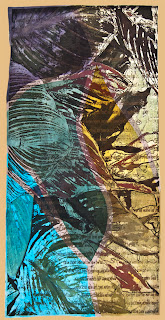 Finished print
Printed the printer plates and collaged silk surface while working on my new mini workshop for members of KathyAnneArt, "Digital Printing on Silk Surfaces.
Next is building paper surfaces by layering, not sure where that will go. I want some new tested surfaces before my digital printing workshop in July where we will get some radical new surfaces created.

Couple of new printers plates printed


and some collaged silk.
 Silk on carrier sheet.
 Finished print
Printed the printer plates and collaged silk surface while working on my new mini workshop for members of KathyAnneArt, "Digital Printing on Silk Surfaces.
Next is building paper surfaces by layering, not sure where that will go. I want some new tested surfaces before my digital printing workshop in July where we will get some radical new surfaces created.
Thursday, June 23, 2011
Art Unraveled Workshops in August
Thought I would give everyone a look at some constructions of studies that will spill over to my Art Unraveled workshops that take place in August right here in Arizona, Phoenix to be exact.


On the first day of Art Unraveled August 2nd I will be teaching "Dimensional Collage with Digital Medium". There is nothing better then to incorporate digital pieces into your artwork. Printing images on alternative surfaces is an amazing way to add texture and fabulous design elements to your art.
For the Dimensional Collage Workshop I will be printing each students images before the workshop so they will have their images on the following surfaces-lutradur, tyvek, cotton and watercolor paper. These surfaces will then be used to create collage for their pieces. Magic happens when the students start to mix all sorts of other items into their collage. There will be all sorts of items from my studio stash for students to use as we create their work.
Starting with smaller studies as a warm up, we will move on to putting those ideas together into either an art book or stand alone collage. Each student will have original work that is clearly their own.


As for my other workshop at Art Unraveled, "Can-Can Art" August 9th, we are going to go over how you can digitally print beverage cans. Once everyone has been through that process and has a couple flattened and coated cans to take home to print, we will play with making things from beverage cans.
Student kits will include printed cans and there will be extras if you run out. It is amazing how cans can be used to create art or interest to collage and art pieces. If you are still looking for a workshop to take at Art Unraveled this year, join us.
Here are some pictures or details of some of my can art.


Join us!


Join us!
Tuesday, June 21, 2011
Starting the Week
Not too much work going on last week- had our grandson here till yesterday. He's 2 and he's really good at it-lol- so between him and the new puppy it was pretty wild and not much working time.
Today I will be finishing an article for Maggie Grey's Workshop on the Web. Recycling is the topic and the piece for the magazine is uses paperback book pages for a journal. There is a new twist to the journal piece in which is excerpted from an upcoming ebook. Check out WOW- there are many interesting articles and writers and Maggie is well know for her work, workshops and books.
Also on tap for this week is my monthly workshop for KathyAnne Art Members. The workshop will be about digital printing in some form. Still working out the details. Thinking it will concern printing light weight silk and take a video form. I want the surface to be thin enough so that any pass through printer will work. I'll test it on my Epson Picture Mate Charm to see what type of printer will work.
Don't forget. I am teaching "Not Just Digital Printing" in my studio July 16 and 17 in a few weeks. Two spots left.


Thursday, June 9, 2011
Another New Printer
Two weeks ago my Epson Stylus Photo R2400 gave up. I returned to my studio one afternoon and there was ink leaking out of the printer and on the desk. To make a long story short it was an end of life problem. Never knew there was such a thing, but if I had a PC that is what the message from the epson utilities would have been. They say you don't get that error message on a Mac. Seems the ink pads that collect the ink cannot be replaced on that printer or actually any in that class and when you do a lot of printing it happens sooner then in lightly used printers. Amazing, but from research with Epson I found out it is expensive to fix, better to get new. HMMMM and my R2400 was working so well for me. Traveling to conferences for years, oh well.
 That brings me to my new Epson Stylus Photo R3000-once again Epson has seriously improved that size printer since 2007 which is when I purchased my R2400. I may have gotten along with my Epson 7890 (see my blog post from March 19, 2011) except that I don't want to print beverage cans on it. The R3000 is really wonderful. It prints a little thicker paper than the 2400 so printing metal mesh, beverage cans, heavy weight canvas, papers and fabrics are a snap. The pic here is set up for a 7 can print. I had to change one of my type of carrier sheets. The cans print best when using the Epson Presentation Matte paper for a carrier sheet. They of course have to be really smooth, no creases or anything and taped well on the edges, but I easily printed 30 cans or so and they look great. It also did a great job on some new brass looking metal mesh I have.


Subscribe to:
Posts (Atom)